Wednesday, September 18, 2013

oracle KILL MY OWN SESSION for developers (without system privilege )

It is a common  request from development to kill some run-away sessions so that they can re-run the application or query.. I have created a procedure to kill your own session. This way,developers can be more productive and not wait for a DBA to do the hunting..

The checks put into the procedure are that it has to run from the same username and from the same laptop as the session you want to kill.

How to run
____________

set serveroutput on -- (for debug info )
exec kill_my_session(183,
6963);


The two parameter passed are SID and SERIAL# from gv$session. This procedure can kill across instances in RAC cluster as well.

SAMPLE OUTPUT
--------------------
anonymous block completed
the procedure got executed by SCOTT-vijay-PC and sid,serial is from SCOTT-vijay-PC instance 1
they are the same user
successful in executing alter system kill session '123,321,@1';

-----
Also, below is a query you could use to see the info from gv$session. One of the column has the kill_my_session() info... you can simply cut and paste :)
This is a handy script to have if you need to kill your session which spawned multiple parallel query slaves and you need to kill the query's main session.
I have not concentrated on formatting since you could use some development tool like sql*developer.


SCRIPT to find you session
-------------------------------
SELECT s.inst_id,
s.program,
s.module,
s.event,
s.username,
s.SQL_ID,
TO_CHAR(sysdate,'SSSSS')- TO_CHAR(sql_exec_start,'SSSSS') sec_since_sqlStart,
machine,
'exec kill_my_session(' ||sid ||',' ||serial# ||');' kill_My_session ,
lpad( TO_CHAR( TRUNC(24 *(sysdate-s.logon_time)) ) || TO_CHAR(TRUNC(sysdate) + (sysdate-s.logon_time) , ':MI:SS' ) , 10, ' ') AS UP_time ,
px.count_pq,
sq.sql_text
FROM gv$session s,
(SELECT qcsid ,COUNT(*) count_pq FROM gv$px_session GROUP BY qcsid
) px ,
v$sqlarea sq
WHERE s.type! ='BACKGROUND'
AND s.status ='ACTIVE'
AND s.sql_id IS NOT NULL
AND s.program NOT LIKE '%(P%)%'
AND s.sql_id =sq.sql_id(+)
AND s.sid =px.qcsid(+);

---------------------
The actual kill_my_session is a procedure owned by a schema with DBA privileges with a public synonym.
you also grant execute on the procedure to public;

create or replace
procedure kill_my_session ( sid_v in number, serial in number ) as
run_by varchar2(32);
sess_user varchar2(32);
inst  number;
my_machine varchar2(32);
sess_machine varchar2(32);
begin
SELECT SYS_CONTEXT ('USERENV', 'SESSION_USER') , SYS_CONTEXT ('USERENV', 'HOST')
   into run_by , my_machine FROM DUAL;
   begin
   select username ,inst_id,machine into sess_user,inst,sess_machine from gv$session where sid=sid_v and serial#= serial;
   exception when no_data_found then
   dbms_output.put_line('no session like that in db');
   end;
  dbms_output.put_line('the procedure got executed by '||run_by||'-'||my_machine||' and sid,serial is from '||sess_user||'-'||sess_machine||' instance '||inst);
   if (run_by=sess_user) and (my_machine=sess_machine) then
     dbms_output.put_line('they are the same user');
     begin
     execute immediate 'alter system kill session '''||sid_v||','||serial||',@'||inst||'''';
     dbms_output.put_line(' successful in executing alter system kill session '''||sid_v||','||serial||',@'||inst||''';');
     exception when others then
     dbms_output.put_line(' error executing alter system kill session '''||sid_v||','||serial||',@'||inst||'''');
     dbms_output.put_line(SUBSTR(SQLERRM(SQLCODE), 1, 250));
     end;
   else
     dbms_output.put_line('cannot kill another user''s session');
  end if;
end;

CREATE OR REPLACE PUBLIC SYNONYM "KILL_MY_SESSION" FOR "<DBA_OWNER>"."KILL_MY_SESSION";

grant execute on KILL_MY_SESSION to PUBLIC;

Monday, September 16, 2013

12c DATA Redaction with DBMS_REDACT to hide sensitive data.

We know that oracle has some high security options like database vault and Virtual private database.
While they are very comprehensive and make the database highly secure, It will still take a DBA/Architect to understand the complete Architecture of the application in order to implement those options. This is something that cannot be implemented quickly or without much thought to the application as a whole. This could be one reason why i am a bit behind on the hands-on of database vault.

On the other hand, Data Redaction is like a security option where the data is scrambled only during the display part of the data.  To understand it better, think of redaction similar to to_char or to_data function in the select part of the sql query. The data is only scrambled  during the select.
Some examples are 

 social_security       543-46-2457        xxx-xx-2457                     -- partial 
 email_id               abc@oracle.com   xxx@oracle.com               -- RegExpression
 Account_balance    640000                0                                    -- Full
 Random_number    3423545              5245663                          -- Random

 The redaction is enabled at a session level based on defined policy. 

 Can we hide data from table owner and expose data only to a application.?
 One common situation is to prevent the data being read,processed or stolen from with-in the organization. One of the greatest risk for data loss is when the password of a high privileged user is compromised and sencitive data is stolen. This is a common scenario and i will try to implement a simple policy which can prevent that..

 The idea is to redact sensitivity data from every session that access the data including the owner of the table and add exception only for the application to view data.
Sounds simple ? 
Yes.. 
As I mentioned earlier, the redaction policy is activated when the session is connected to the database or plugable database. Redaction takes place only if this policy expression evaluates to TRUE. This expression must be based on SYS_CONTEXT values from a specified namespace. 
The expression that needs to be true includes SYS_CONTEXT= user, module, service ,machine.  or 1=1.
In a ideal world, you could set  expression='SYS_CONTEXT=CLIENT_IDENTIFIER' which is coded into the application. but to demonstrate a simple Cut&Paste scenario,I opted to have the session expression evaluate to true when connected to default service_name. And if you need to connect to the same database through an application, simply add a service to the database and connect through that servece by only changing the tnsnames.ora This way, you can have a simple redaction of data with no application code change or manual intervention once the policy is set. 


SQL> set pages 0
SQL> conn sys/oracle@pdb1 as sysdba
Connected.
SQL> --create two users
SQL>
SQL> drop user vijay cascade;

User dropped.

SQL> create user vijay identified by oracle;

User created.

SQL> grant connect,resource to vijay;

Grant succeeded.

SQL> grant execute on dbms_redact to vijay;

Grant succeeded.

SQL> grant unlimited tablespace to vijay;

Grant succeeded.

SQL> drop user vijay1 cascade;

User dropped.

SQL> create user vijay1 identified by tiger;

User created.

SQL> grant connect,resource to vijay1;

Grant succeeded.

SQL> conn vijay/oracle@pdb1
Connected.
SQL> -- as first user, create a table with SS column
SQL> create table  creditcard_info (customer_name,SS) as select object_name, object_id from all_objects;

Table created.

SQL> grant select on vijay.creditcard_info to public;

Grant succeeded.

SQL> -- select from the table and observe SS column
SQL> col customer_name format a20
SQL> col ss format 9999
SQL> select * from vijay.creditcard_info fetch first 5 rows only;
ORA$BASE             133
DUAL                 142
DUAL                 143
MAP_OBJECT           348
SYSTEM_PRIVILEGE_MAP 445

SQL> -- create redact policy where service_name is default service_name
SQL> declare
  2  service_name varchar2(10);
  3  begin
  4   select SYS_CONTEXT('USERENV','SERVICE_NAME') into service_name from dual;
  5   DBMS_REDACT.ADD_POLICY (policy_name   => 'Redact_SS',object_schema => 'VIJAY',
  6  object_name   => 'CREDITCARD_INFO', column_name   => 'SS',
  7  expression    => 'SYS_CONTEXT(''USERENV'',''SERVICE_NAME'') ='''||service_name||'''',
  8  function_type => DBMS_REDACT.FULL);
  9  end;
10  /

PL/SQL procedure successfully completed.

SQL>
SQL> -- observe that even the table owner is not able view the column content
SQL> select * from vijay.creditcard_info fetch first 5 rows only;
ORA$BASE              0
DUAL                  0
MAP_OBJECT            0
SYSTEM_PRIVILEGE_MAP  0

SQL> -- connect as second user and that user cannot see column as well
SQL> conn vijay1/tiger@pdb1
Connected.
SQL>
SQL> col customer_name format a20
SQL> col ss format 9999
SQL> select * from vijay.creditcard_info fetch first 5 rows only;
ORA$BASE              0
DUAL                  0
MAP_OBJECT            0
SYSTEM_PRIVILEGE_MAP  0

SQL>
SQL> -- NOW, connect to sys and create a new service to the same pdb
SQL> conn sys/oracle@pdb1 as sysdba
Connected.
SQL> exec DBMS_SERVICE.stop_service('pdb1_app');

PL/SQL procedure successfully completed.

SQL> BEGIN
  2    DBMS_SERVICE.DELETE_SERVICE(
  3       service_name => 'pdb1_app');
  4  end;
  5  /

PL/SQL procedure successfully completed.

SQL> BEGIN
  2       DBMS_SERVICE.CREATE_SERVICE(
  3       service_name => 'pdb1_app',
  4       network_name => 'pdb1_app');
  5    DBMS_SERVICE.start_service('pdb1_app');
  6  END;
  7  /

PL/SQL procedure successfully completed.

SQL>
SQL> -- Now test your application can access thorugh this new service and can see the rows..
SQL>
SQL> conn vijay/oracle@localhost:1521/pdb1_app
Connected.
SQL>
SQL> col customer_name format a20
SQL> col ss format 9999
SQL> select * from vijay.creditcard_info fetch first 5 rows only;
ORA$BASE               133
DUAL                   142
DUAL                   143
MAP_OBJECT             348
SYSTEM_PRIVILEGE_MAP   445


if you have a middle tier and an application to test this,,  you can have multiple AND condition in the expression validity to make it even more secure. For example, you could have a condition of where hostname = middletier_hostname and service=pdb1_app.
e.g.
expression    =>  'SYS_CONTEXT (''USERENV'', ''HOST'') = ''localhost.localdomain'' and SYS_CONTEXT(''USERENV'',''SERVICE_NAME'') =''pdb1_app''',

I want to point out, that this is a easy way to prevent  users  from accessing data outside of the intended application. This still does not prevent privileged users who have  "EXEMPT REDACTION POLICY"  system privilege including DBA roles. This is a first step that can prevent hacking by under-privileged users. To get a more comprehensive security, DB vault, Virtual Private Database and Fine Grain Access Control are additional options.

Friday, September 13, 2013

12c SGA memory distribution by PDBs

With 12c multi-tenant architecture, you could have  several Pluggable database in one Container Database(CBD).
The consolidated architecture is more efficient in using the server's CPU and memory among PDBs.

One question that arises is " can you tell what percent of total  buffers is used up by each PDBs ? "

Below script can tell you just that. You will have to run this at CDB level in your database.

 col PCT_BARCHART format a30
 set linesize 200
 col name format a10
 col con_id format 99
 col PCT format 999
    SELECT NVL(pdb.name,'CDB') name,b.con_id,
  ROUND(b.subtotal *
  (SELECT value FROM V$PARAMETER WHERE name = 'db_block_size'
  )                        /(1024 *1024)) bufferCache_MB,
  ROUND(b.subtotal         /b.total * 100) PCT,
  rpad('*',ROUND(b.subtotal/b.total * 100),'*') PCT_BARCHART
FROM
  ( SELECT DISTINCT a.*
  FROM
    (SELECT con_id,
      COUNT(*) over (partition BY con_id ) subtotal ,
      COUNT(*) over () total
    FROM sys.gv$bh
    ) a
  )b, v$pdbs pdb
  where b.con_id=pdb.con_id(+)
ORDER BY con_id;


output.


NAME      CON_ID BUFFERCACHE_MB  PCT PCT_BARCHART
---------- ------ -------------- ---- ------------------------------
CDB 1              131   28 ****************************
PDB$SEED 2               14    3 ***
PDB1 3               18    4 ****
PDB2 4               89   19 *******************
PDB_2 5               41    9 *********
PDB_1 6               41    9 *********
PDB_4 7               39    8 ********
PDB_3 8               43    9 *********
PDB_5 9               44    9 *********

9 rows selected.


 SQL> 

Wednesday, September 11, 2013

12c clone PDBs in parallel

In one of the 12c Features presentation, one of the questions asked was if a Clone of PDBs can run in parallel ?
I.E, are there any locks held that will serialize creation of cloned PDBs. 

To clone a PDB in 12c, the procedure is to make the source PDB in read only mode, or use SEED database which is always in read only mode, i was fairly certain that no locks will be held. Still, to rule out any doubt, i ran a simple test. I created 5 PDBs in 5 different sessions at the same time. I noticed that all the PDBs were created at the same time proving that they can be created in parallel. 

The top wait event was "Pluggable Database file copy" of  "User I/O"  wait class while PDBs were being created.

below is the test script and the output.

[oracle@localhost pdbtest]$ cat a.sh
echo " starting PDBS at  $(date)"
for i in {1..5}
do
   echo "Welcome $i times"
  rm -r /home/oracle/pdbtest/$i
   mkdir /home/oracle/pdbtest/$i
   /home/oracle/pdbtest/b.sh $i &
done
wait
echo " Ending  PDBS at  $(date)"
[oracle@localhost pdbtest]$ 

[oracle@localhost pdbtest]$ cat b.sh

sqlplus -s sys/oracle as sysdba << __EOF__
set timing on
set echo on
-- SELECT $1 from dual;
CREATE PLUGGABLE DATABASE pdb_$1
  ADMIN USER  pdb_$1 IDENTIFIED BY oracle
  ROLES = (dba)
  FILE_NAME_CONVERT = ('/u01/app/oracle/oradata/cdb1/pdbseed/',
                       '/home/oracle/pdbtest/$1/');
   drop pluggable database pdb_$1 including datafiles;
exit;
__EOF__
[oracle@localhost pdbtest]$ 


The output below.
[oracle@localhost pdbtest]$ ./a.sh
starting PDBS at  Thu Sep 12 12:42:06 UTC 2013
Welcome 1 times
Welcome 2 times
Welcome 3 times
Welcome 4 times
Welcome 5 times

Pluggable database created.

Elapsed: 00:00:29.82

Pluggable database created.

Elapsed: 00:00:30.04

Pluggable database dropped.

Elapsed: 00:00:00.45

Pluggable database created.

Elapsed: 00:00:30.29

Pluggable database dropped.

Elapsed: 00:00:00.37

Pluggable database dropped.

Elapsed: 00:00:00.30

Pluggable database created.

Elapsed: 00:00:30.59

Pluggable database created.

Elapsed: 00:00:30.67

Pluggable database dropped.

Elapsed: 00:00:00.18

Pluggable database dropped.

Elapsed: 00:00:00.16
Ending  PDBS at  Thu Sep 12 12:42:38 UTC 2013

12c Consolidated AWR report with PDBs

 For a DBA, Automatic Workload Repository (AWR) is THE tool that helps in diagnosis and tuning.  However, with 12c multi-tenant architecture, where one Container Database (CDB) can have multiple Pluggable Database (PDB).  what will happen to the AWR ? 

The Manual  explains 12c AWR as follows.
"If a dictionary table stores information that pertains to the CDB as a whole, instead of for each PDB, then both the metadata and the data displayed in a data dictionary view are stored in the root. For example, Automatic Workload Repository (AWR) data is stored in the root and displayed in some data dictionary views, such as the DBA_HIST_ACTIVE_SESS_HISTORY view. An internal mechanism called an object link enables a PDB to access both the metadata and the data for these types of views in the root."

 It implies that, all the AWR snapshots is taken at CDB level and PDBs have appropriate views  for its corresponding con_id of individual PDBs.
It make total sense in a consolidated environment. If you want to see I/O, cpu utilization on a server, you can get a full picture at a CDB level. Until now in 11g, you needed to login to every DB to check what was happening at a particular time period during say heavy i/o. Now in 12c, you have a global view of all your database(PDBs)  activities on a server at CDB AWR. The individual PDBs still will have views to monitor sqls pertaining to it.

 A simple test is to run  exec dbms_workload_repository.create_snapshot();  in any PDB and CDB and check the max snap_id for each PDB and CDB. (select  con_id,max(snap_id) from dba_hist_sqlstat group by con_id;)
The snap_id is  the same for all PDBs and CDB. This implies, no matter where you run create_snapshot(), Repository is always at CDB level. and every PDB in the DB will get updated VIEW related to its environment.

Below is a small test...


SQL> @a
SQL> -- conn as container DB
SQL> conn sys/oracle as sysdba
Connected.
SQL> show pdbs

    CON_ID CON_NAME              OPEN MODE  RESTRICTED
---------- ------------------------------ ---------- ----------
     2 PDB$SEED              READ ONLY  NO
     3 PDB1               READ WRITE NO
     4 PDB2               MOUNTED
     5 DEV2               READ WRITE NO
SQL> exec dbms_workload_repository.create_snapshot();

PL/SQL procedure successfully completed.

SQL> select con_id,max(snap_id) from dba_hist_sqlstat group by con_id order by 1;

    CON_ID MAX(SNAP_ID)
---------- ------------
     1       1204
     3       1204
     5       1204

SQL> ---
SQL> -- conn to pdb called dev2
SQL> --
SQL> conn system/manager@dev2
Connected.
SQL> show pdbs

    CON_ID CON_NAME              OPEN MODE  RESTRICTED
---------- ------------------------------ ---------- ----------
     5 DEV2               READ WRITE NO
SQL> -- check the max snap_id
SQL> select con_id,max(snap_id) from dba_hist_sqlstat group by con_id;

    CON_ID MAX(SNAP_ID)
---------- ------------
     5       1204

SQL> exec dbms_workload_repository.create_snapshot();

PL/SQL procedure successfully completed.

SQL> select con_id,max(snap_id) from dba_hist_sqlstat group by con_id order by 1;

    CON_ID MAX(SNAP_ID)
---------- ------------
     5       1205

SQL> --
SQL> -- connect back to cdb and recheck  max snap_id
SQL> conn sys/oracle as sysdba
Connected.
SQL> select con_id,max(snap_id) from dba_hist_sqlstat group by con_id order by 1;

    CON_ID MAX(SNAP_ID)
---------- ------------
     1       1205
     3       1205
     5       1205

------------------------------------

The next question you might ask is
" can i run AWR reports from PDBs as well as CDBs for consolidated report ? "

Answer: Yes. awrrpt.sql will run at CDB level and PDB level. 
When a snapshot is taken either in PDB or CDB, the data is first populated in the CDB repository. each PDB has all the tables that is required for running awr reports. These tables are populated through object link views from the CDB with information only pertaining to that PDB.

So awrrpt.sql will run at both PDB and CDB levels without errors. However, at PDB level, it will only have info pertaining to it.

Update: If you want to see all the objects with OBJECT link to CDB, you can run the following query.

select distinct object_name from dba_objects where sharing ='OBJECT LINK';

Wednesday, July 24, 2013

parallel_enable partition by hash cluster

parallel_enable partition by hash


Below i have tried to illustrate a simple example of using GROUP BY function with PARALLEL_ENABLE TABLE functions in ORACLE.


-- Assume you create a sample dataset from DBA_OBJECTs and you want to run a simple sum(obect_id) and count(object_id) group by owner ..


/* now a simple group by result will look like this.
*/

 however, if the data in the table has to be validated through a complex validation process, then this could take a lot of time when the table is large.
 This is because the validation process done through procedure or function is a serial process. In order to speed this process, we can run the validation process in parallel through use of parallel_enabled table function, but still maintain the ability to group by column for the end output. This way, you will be able run data validation process in parallel and at the same time create table functions capable of doing GROUP BY  aggregations.
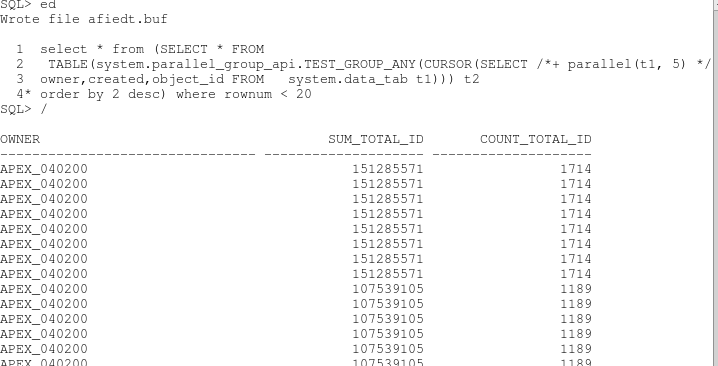
-- now in my first iteration, I try to do the  paralle_enable table function using  PARTITION BY ANY,  This is the what is most common way to partition data.

the function created to do this is below.

FUNCTION test_group_any( p_cursor IN SYS_REFCURSOR)
  RETURN t_owner_summary_tab PIPELINED PARALLEL_ENABLE(
    PARTITION p_cursor BY ANY)
IS
  in_row data_tab%ROWTYPE;
  out_row t_owner_summary_row ;
  v_total NUMBER := NULL;
  v_owner data_tab.owner%TYPE;
  v_count NUMBER := 0;
BEGIN
  -- for every transaction
  LOOP
    FETCH p_cursor
    INTO in_row;
    EXIT
  WHEN p_cursor%NOTFOUND;
    -- if we pass the extensive validation check
    --   IF super_complex_validation(
in_row.object_id,in_row.owner) THEN
    -- set initial total or add to current  total
    -- or return total as required
    IF v_total        IS NULL THEN
      v_total         := in_row.object_id;
      v_owner         := in_row.owner;
      v_count         := 1;
    ELSIF in_row.owner = v_owner THEN
      v_total         := v_total + in_row.object_id;
      v_count         := v_count + 1;
    ELSE
      out_row.owner          := v_owner;
      out_row.sum_total_id   := v_total;
      out_row.count_total_id := v_count ;
      PIPE ROW(out_row);
      v_total := in_row.object_id;
      v_owner := in_row.owner;
      v_count := 1;
    END IF;
    --  END IF;  -- end super complex validation 
  END LOOP; -- every transaction
  out_row.owner          := v_owner;
  out_row.sum_total_id   := v_total;
  out_row.count_total_id :=v_count;
  PIPE ROW(out_row);
  RETURN ;
END test_group_any;


-- the data processed by each parallel process is random and you will get a lot more rows than expected.. The result is not what we are looking for.
 So what if you partition by hash on owner ?
 Note:  in order to PARTITION BY HASH,  the database needs to know the table/object you are passing. so a sys_refcursor will not work.  I changed sys_refcursor to table of %ROWTYPE. from the above function and changed to PARTITION BY HASH instead of PARTITION by ANY.

FUNCTION test_group_hash(  p_cursor IN t_data_tab_ref_cursor)
  RETURN t_owner_summary_tab PIPELINED PARALLEL_ENABLE(  PARTITION p_cursor BY HASH(  owner))
IS


-- still not what we want.. the output is almost similar to partition by any ..
-- so now, i added one additional line  CLUSTER BY OWNER.  This will tell the database to send all rows with the same value for owners to a single parallel slave function. 

FUNCTION test_group_hashcluster(  p_cursor IN t_data_tab_ref_cursor)
  RETURN t_owner_summary_tab PIPELINED PARALLEL_ENABLE(   PARTITION p_cursor BY HASH(  owner))
 CLUSTER p_cursor BY(  owner)


 Hurray. success

 now the result is exactly similar to our sql group by function.
however, it took about 27 seconds even with parallel degree 5 in my Virtual machine ..
So i added code to BULK COLLECT in parallel and it runs in less than 2 seconds.


Acknowledgments.
  Darryl Hurley who wrote chapter Chapter 3 


dbms_comparison quicker than SQL MINUS


Overview


The DBMS_COMPARISON package is an Oracle-supplied package that you can use to compare database objects at two databases. This package also enables you converge the database objects so that they are consistent at different databases. Typically, this package is used in environments that share a database object at multiple databases. When copies of the same database object exist at multiple databases, the database object is a shared database object.
Using DBMS_COMPARISON is considered to be faster than traditional comparison  and used internally by database when using streams replication. When the data to be compared is huge, this package could speed up comparison.


Limitation

The index columns in a comparison must uniquely identify every row involved in a comparison. The following constraints satisfy this requirement:
  • A primary key constraint
  • A unique constraint on one or more non-NULL columns

Performance

   Internally the package does  a FAST INDEX SCAN on the primary key or unique key INDEX to find the MIN and MAX value of the table.
     Then, it does a FULL TABLE SCAN to populate the buckets. If there is  miss match in the checksum values of the data in these buckets, additional scans are done to identify the rows..

   The performance of the dbms_compare is equal to the time it takes to do 2 FAST INDEX SCANS and 2 FULL TABLE SCANS. 
    To speed this further, you could 
  • Alter the degree of the underlying tables 
  • enable PARALLEL DEGREE_POLICY to AUTO and PARALLEL_DEGREE_LIMIT=8 to speed it further. and after it completes, set the parameter back to original value  

Advantage over sql minus

To get all rows without dbms_compare will take 4 FTS with could take double the time as dbms_compare.  delta = (A-B) U (B-A)

  select * from table_A 
  minus
  select * from table_B
  union all
  (select * from table_B
  minus
  select * from table_A) ;
    
  • This would take 4 FULL TABLE SCANS compared to 2 in DBMS_COMPARE.
  •  it took a lot more temporary tablespace than dbms_compare as it has to sort the entire table with all the columns.
Also, the rowid of the divergent rows are stored for each comparison. So if we need to converge the data, it can done very quickly. 


Perform a Compare with DBMS_COMPARISON

To perform a comparison you will follow these steps:
  1. Create the comparison 
  2. Execute the comparison 
  3. Review the results of the comparison 
  4. Converge the data if desired
  5. Recheck data (the synced data -- optional) 
  6. Purge and Drop

Create Comparison


BEGIN
dbms_comparison.create_comparison(
comparison_name=>'VJ_COMPARE',
schema_name=>'SCOTT',
object_name=>'PO_TXN',
dblink_name=>null,
remote_schema_name=>'SCOTT',
remote_object_name=>'VJ_PO_TXN');
END;
/

Execute Comparison

-- If the Primary key or unique index are already defined on the table, then it is picked up automatically for comparision.

Set serveroutput on
declare
     compare_info dbms_comparison.comparison_type;
     compare_return boolean;
begin
     compare_return :=
     dbms_comparison.compare (
     comparison_name=>'VJ_COMPARE',
     scan_info=>compare_info,
     perform_row_dif=>TRUE);
     if compare_return=TRUE
     then
          dbms_output.put_line('the tables are equivalent.');
     else
          dbms_output.put_line('Bad news... there is data divergence.');
          dbms_output.put_line('Check the  and
               dba_comparison_scan_summary views for locate the differences for
               scan_id:'||compare_info.scan_id);
     end if;
end;
/


Data Converge (optional)

  If you want to converge the data, you can use DBMS_COMPARISON.CONVERGE to sync the tables. You need to specify which table is the master whose data is merged.
  
set serveroutput on
  declare
     compare_info dbms_comparison.comparison_type;
     scan_id_num number;
begin
      select scan_id into scan_id_num from DBA_COMPARISON_SCAN_SUMMARY where comparison_name='VJ_COMPARE' and status='ROW DIF';
     dbms_comparison.converge (
          comparison_name=>'VJ_COMPARE',
          scan_id=>scan_id_num,
          scan_info=>compare_info,
          converge_options=>dbms_comparison.CMP_CONVERGE_LOCAL_WINS);
          -- converge_options=>dbms_comparison.CMP_CONVERGE_REMOTE_WINS is the other option.
          dbms_output.put_line('--- Results ---');
          dbms_output.put_line('Local rows Merged by process:
                               '||compare_info.loc_rows_merged);
          dbms_output.put_line('Remote rows Merged by process:
                               '||compare_info.rmt_rows_merged);
          dbms_output.put_line('Local rows Deleted by process:
                               '||compare_info.loc_rows_deleted);
          dbms_output.put_line('Remote rows Deleted by process:
          '||compare_info.rmt_rows_deleted);
end;
/

Drop Comparison


 BEGIN
  DBMS_COMPARISON.PURGE_COMPARISON(
    comparison_name => 'VJ_COMPARE',
    scan_id         => NULL,
    purge_time      => NULL);
END;
/

BEGIN
  DBMS_COMPARISON.DROP_COMPARISON(
    comparison_name => 'VJ_COMPARE');
END;
/